Friday, November 3, 2017


Even my Windows Firewall is turned off still get the following warning message every hour. I can telnet to port 1433 & 4022 successfully. This is co-located SQL server on the primary site server.
SMS_HIERARCHY_MANAGER reports (Message ID=3353): “Hierarchy Monitoring detected that the ConfigMgr SQL Server <fqdn> ports 1433, 4022, are not active on Firewall exception.”

Hierarchy Monitoring detected that the ConfigMgr SQL Server

 <fqdn>ports 1433,4022, are not active on Firewall exception. 


Description


Can we please get a Registry key setup to prevent this message from being generated. This cause the 
CM12 site  to always be in a warning state, when the firewall is disabled. Thereby making the making the 
site stat useless!
SMS_HIERARCHY_MANAGER reports (Message ID=3353):
"Hierarchy Monitoring detected that the ConfigMgr SQL Server <fqdn> ports 1433,4022, are not active on 
Firewall exception."

 
I suggest that following:
Under the following Registry key:
HKEY_LOCAL_MACHINE\SOFTWARE\Microsoft\SMS\Components\SMS_HIERARCHY_MANAGER

Create a Dword value called: IgnoreSQLFirewallPorts
When this value is set to 1 , the above message will never be generated

Wednesday, November 16, 2016

Error when installing SCCM client

Error message : "The client version 5.00.7958.1000 does not match the MP version 4.00.6487.2000"


Solution : 

Copy the ccmclean.exe to the client machine and then run ccmclean /MP.

After this run the client installation , this should be work.

Get download ccmclean.exe at http://download.cnet.com/CCMClean/3000-2096_4-76115934.html

Wednesday, September 28, 2016


How to view windowsupdate.log in Windows 10.

Using Windows PowerShell cmdlet to re-create the WinodwsUpdate.log, like it has been in previous versions of Windows.

1. Launch Powershell
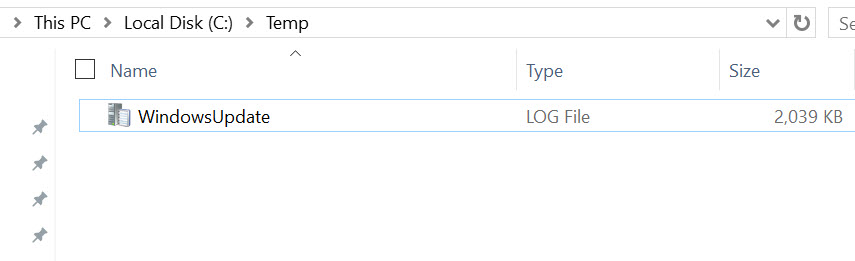
2. Run command "Get-WindowsUpdateLog -logpath C:\Temp\WindowsUpdate.log"


3. Wait until the command successfully completed.


4. Open the windowsupdate.log from c:\temp with cmtrace


How to activate Windows 10 license with command line.


1. Run Command Prompt as Administrator
2.  Type slmgr -ipk XXXX-XXXX-XXXX-XXXX-XXXX
3.. Activatiton done.

Friday, June 10, 2016


SCCM Software Updates Error : onsearchcomplete - failed to end search job. error = 0x8007000e in WUAHandler.log and Windows update.log

Reason:
This error due to memory leakage of System (which system performance can be decreased during scans) or Not enough storage on client machine.


Microsoft have released patch to resolve this issues. refer to this link.

https://social.technet.microsoft.com/Forums/windows/en-US/4a782e40-bbd8-40b7-869d-68e3dfd1a5b4/windows-update-scan-high-memory-usage?forum=w7itproperf


Solution : -

Apply this patches to windows 7 and restart the machines. Run the SCCM cycles to generate the scan.

This time client will successfully scanned and receive windows update from sccm.


Tuesday, June 7, 2016


Message ID 2719:
Inventory Data Loader failed to process the file D:\Program Files\Microsoft Configuration Manager\inboxes\auth\dataldr.box\Process\HDD6EP0U.MIF because it is larger than the defined maximum allowable size of 5000000.
Solution: Increase the maximum allowable size, which is defined in the registry key HKLM\Software\Microsoft\SMS\Components\SMS_INVENTORY_DATA_LOADER\Max MIF Size (the default is 5 MB), and wait for Inventory Data Loader to retry the operation

This is an easy fix.

  1. On the CM12 Site Server, open regedit.exe.
  1. Drill down to HKLM\Software\Microsoft\SMS\Components\SMS_INVENTORY_DATA_LOADER.
  1. Find Max MIF Size and double click it.
  1. Change the value to 3200000 (Hex), which is 50 MB. By the way, the actual default value is 4c4b40 (hex) or 5000 kilobytes which is just under 5 MB.
  1. Close regedit.exe and clear out any errors/warnings for SMS_INVENTORY_DATA_LOADER.

Now you’re done!


Thanks for http://www.enhansoft.com/blog/change-the-maximum-file-size-of-management-information-files-mif-in-sccm-2012

Monday, May 23, 2016

Error in windows 10 activation - 0xd0000272


Workaround:-

1. Delete "windows update" key from HKEY_LOCAL_MACHINE\SOFTWARE\Policies\Microsoft\Windows\WindowsUpdate.

2. Try activate again , the activation should be successful. 

Wednesday, April 13, 2016

SCCM Agent Failed to install

Checked the c:\windows\ccm\ccmsetup.log and found 
Error message: Download  Update: copy has been queued.

Resolution:-
  1. Stop BITS Service and Ccmsetup service.
  2. Run below command
              -Bitsadmin.exe /RESET /Allusers
              -Bitsadmin.Exe /List 
  1. Then force install SCCM Agent by run this command
                            CCMSetup.exe /BITSPriority:FOREGROUND 


How to Prepare Master Image for SCCM Agent 2012 R2/R2 SP1 or SP 2

1) Install the ConfigMgr client on the Master Image
2) After succesfully installed then Stop the SCCM client service as below
           - Start > Run - CMD.exe
           - Type > Net stop "SMS Agent Host"
3) Delete the SMSCFG.ini file from the Windows folder  at “ %WINDIR%\smscfg.ini”
4) Remove the 2 SMS certificates in the local certificate store by run this command in powershell           1. Remove-Item -Path  HKLM:\Software\Microsoft\SystemCertificates\SMS\Certificates\* -Force
5) Remove the Inventory Action ID 1 in WMI = run the command wmic          
     /namespace:\\root\ccm\invagt path inventoryActionStatus where InventoryActionID=”{00000000-0000-0000-0000-000000000001}” DELETE /NOINTERACTIVE
6) Sysprep and shutdown
7) Create Master Image.

SCCM build numbers.

System Center Configuration Manager Current Branch
Build NumberKBRelease DateDescription
5.0.8299.10002015, September 22SCCM Update 1509
5.0.8315.10002015, October 14SCCM Update 1510
5.0.8325.10002015, November 12SCCM Update 1511
5.0.8336.10002015, December 18SCCM Update 1512
5.0.8347.10002016, January 27SCCM Update 1601
5.0.8355.10002016, March 10SCCM Update 1602
System Center Configuration Manager 2012 R2
Build NumberKBRelease DateDescription
5.00.7958.1000–2013, October 18SCCM 2012 R2 RTM
5.00.7958.1101KB29050022013, November 02SCCM 2012 Post R2 Hotfix
5.00.7958.1203KB29384412014, March 28SCCM 2012 R2 CU1
5.00.7958.1303KB29701772014, June 27SCCM 2012 R2 CU2
5.00.7958.1401KB29943312014, September 23SCCM 2012 R2 CU3
5.00.7958.1501KB30267392015, February 2SCCM 2012 R2 CU4
5.00.7958.1604KB30544512015, May 6SCCM 2012 R2 CU5
5.00.8239.1000–2015, May 14SCCM 2012 R2 SP1
5.00.8239.1203KB30748572015, August 4SCCM 2012 R2 SP1 CU1
5.00.8239.1301KB31001442015, November 10SCCM 2012 R2 SP1 CU2
5.0.8239.1403KB31356802016, February 26SCCM 2012 R2 SP1 CU3
System Center Configuration Manager 2012 SP1 & SP2
Build NumberKBRelease DateDescription
5.00.7804.1000––SCCM 2012 SP1
5.00.7804.1202KB2817245SCCM 2012 SP1 CU1
5.00.7804.1300KB2854009SCCM 2012 SP1 CU2
5.00.7804.1400KB2882125SCCM 2012 SP1 CU3
5.00.7804.1500KB2922875SCCM 2012 SP1 CU4
5.00.7804.1600KB29780172014, July 23SCCM 2012 SP1 CU5
5.00.8239.1000–2015, May 14SCCM 2012 SP2
5.00.8239.1203KB30748572015, August 4SCCM 2012 SP2 CU1
5.00.8239.1301KB31001442015, November 10SCCM 2012 SP2 CU2
5.0.8239.1403KB31356802016, February 26SCCM 2012 R2 SP2 CU3
System Center Configuration Manager 2012
Build NumberKBRelease DateDescription
5.00.7711.0000–2012, March 31SCCM 2012 RTM
5.00.7711.0200KB27172952012, August 22SCCM 2012 CU1
5.00.7711.0301KB27806642012, November 27SCCM 2012 CU2
System Center Configuration Manager 2007
Build NumberKBRelease DateDescription
4.00.5135.0000SCCM 2007 Beta 1
4.00.5125.0000SCCM 2007 Beta 1 Escrow
4.00.5221.0000SCCM 2007 Beta 1 Refresh Escrow
4.00.5224.0000SCCM 2007 Beta 1 Refresh
4.00.5571.0000SCCM 2007 Beta 2 Escrow
4.00.5574.0000SCCM 2007 Beta 2 Escrow Update
4.00.5578.0000SCCM 2007 Beta 2 with a hotfix
4.00.5578.0002SCCM 2007 RC0 Preview
4.00.5790.0000SCCM 2007 RC0 Preview
4.00.5815.0000SCCM 2007 RC0
4.00.5924.0000SCCM 2007 escrow
4.00.5931.0001SCCM 2007 RTM
4.00.6086.1000SCCM 2007 SP1 (prerelease)
4.00.6221.1000SCCM 2007 SP1
4.00.6221.1193KB977203FIX for SCCM 2007 SP1 and SP2
4.00.6425.2000SCCM 2007 SP2 beta
4.00.6468.2001SCCM 2007 SP2 RC
4.00.6487.2000SCCM 2007 SP2
4.00.6487.2111KB977203FIX for SCCM 2007 SP1 and SP2
4.00.6487.2157SCCM 2007 SP2 R3
4.00.6487.2207KB27507822012, December 03FIX for SCCM 2007 SP2
4.00.6487.2700SCCM SP2 R2 with ICP2
4.00.6487.2857SCCM SP2 R3 with ICP2
SMS 2003
Build NumberKBRelease DateDescription
2.50.2726.0020––SMS 2003 RTM
2.50.3174.1018KB8856442004, September 10SMS 2003 SP1
2.50.4160.2000KB8997382006, February 13SMS 2003 SP2
2.50.4253.3000KB9338672007, May 2SMS 2003 SP3
SMS 2.0
Build NumberKBRelease DateDescription
2.00.1239.0000––SMS 2.0 RTM
2.00.1380.1000–SMS 2.0 SP1
2.00.1493.2000KB258682–SMS 2.0 SP2
2.00.1493.3000KB280756–SMS 2.0 SP3
2.00.1493.4000KB308269–SMS 2.0 SP4
2.00.1493.5000Description–SMS 2.0 SP5
SMS 1.X
Build NumberRelease DateDescription
–1994, November 7SMS 1.0
–1995, July 25SMS 1.1
–1996, July 29SMS 1.2